
وەسف
Show a HTML code when you place the [WPeBanOver] shortcode, on mouse (over, out, click, dblclick) show another HTML code until mouseout, anywhere in your template, post, page or widget.
You can read, follow, donate and comment about this plugin at author page: netmdp.com
سکرین شۆتەکان
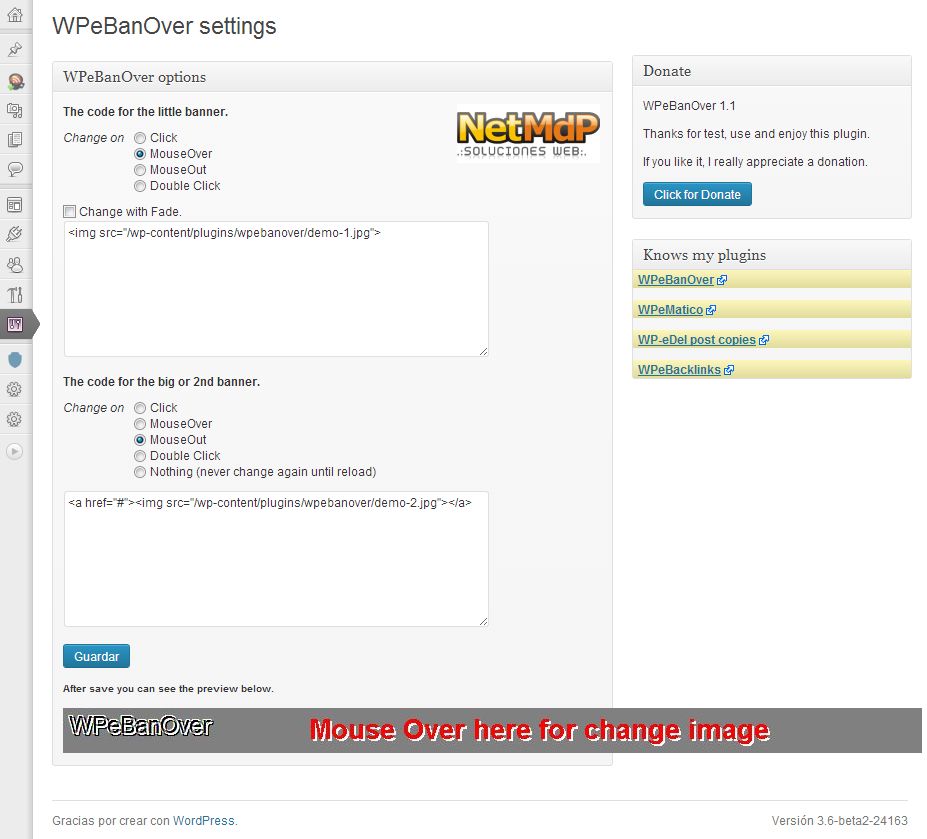
دامەزراندن
You can either install it automatically from the WordPress admin, or do it manually:
- Unzip “WPeBanOver” archive and put the folder into your plugins folder (/wp-content/plugins/).
- Activate the plugin through the ‘Plugins’ menu in WordPress
- For print place
<?php if ((function_exists('WPeBanOver'))) WPeBanOver(); ?>in your templates or use shortcode [WPeBanOver] in widgets, post or pages - For get the html string use
<?php get_WPeBanOver(); ?> - Also have the css class .WPeBanOver then you can add your style
پهد
- Comming Soon
پێداچوونەوەکان
هیچ پێداچوونەوەیەک نەنووسراوە بۆ ئەم پێوەکراوە.
بەشداربووان و گەشەپێدەران
“WPeBanOver” نەرمەواڵەیەکی سەرچاوە کراوەیە. ئەم کەسانەی خوارەوە بەشدارییان تێدا کردووە.
بەشداربووان
“WPeBanOver” وەربگێڕە بۆ زمانەکەی خۆت.
دەتەوێت بەشداربیت لە گەشەپێدان؟
گەڕان لە کۆدەکەدا بکە، سەیری تەمارگەی (SVN) بکە، یان بەشداربە لە ڕووداوتۆماری گەشەپێدان لە ڕێگەی (RSS).
ڕووداوتۆمارگەریی گۆڕین
1.1
Added plus change banner methods,click, MouseOut, Double Click.
Now second banner can remains until reload page.
Added Fade IN/OUT option to change.
Added .pot file for localization
Fixed and upgraded spanish language.
1.0
First Release