بازدان بۆ ناوەڕۆک
WordPress.org

وۆردپرێس بەکوردی

  • ڕووکارەکان
  • پێوەکراوەکان
  • دەربارە
  • وۆردپرێس بە دەستبێنە
وۆردپرێس بە دەستبێنە
WordPress.org

Plugin Directory

WP ShareX

  • پێوەکراوێک بڵاوبکەرەوە
  • دڵخوازەکانم
  • Log in
  • پێوەکراوێک بڵاوبکەرەوە
  • دڵخوازەکانم
  • Log in

This plugin hasn’t been tested with the latest 3 major releases of WordPress. It may no longer be maintained or supported and may have compatibility issues when used with more recent versions of WordPress.

WP ShareX

لەلایەن joomdev
داگرتن
  • وردەکارییەکان
  • پێداچوونەوەکان
  • دامەزراندن
  • گەشەپێدان
پشتیوانی

وەسف

WP ShareX is an advanced WordPress Social Share plugin enables you to add social share buttons on Posts and pages. You can assign buttons on Top of the Content, Bottom of the Content, Sidebar and on media.

Features of WP Social Share by JoomDev
1. 24 Social Network
2. You have the option to select either Icons or Icons with Text
3. 3 Button Shapes
4. 4 Button Animations
5. URL Shortening Option with Bitly and Goo.gl
6. Embed Twitter Handle and desired tags with Tweet
7. 4 Button display Location e.i. Top of the Content, Bottom of the content, Media, and Sidebar
8. Hide On Mobile Ability
9. Default Share Count Option. (You can play with your user’s mind)
10. Encourage your Audience to share your content with Share Incentive Feature

سکرین شۆتەکان
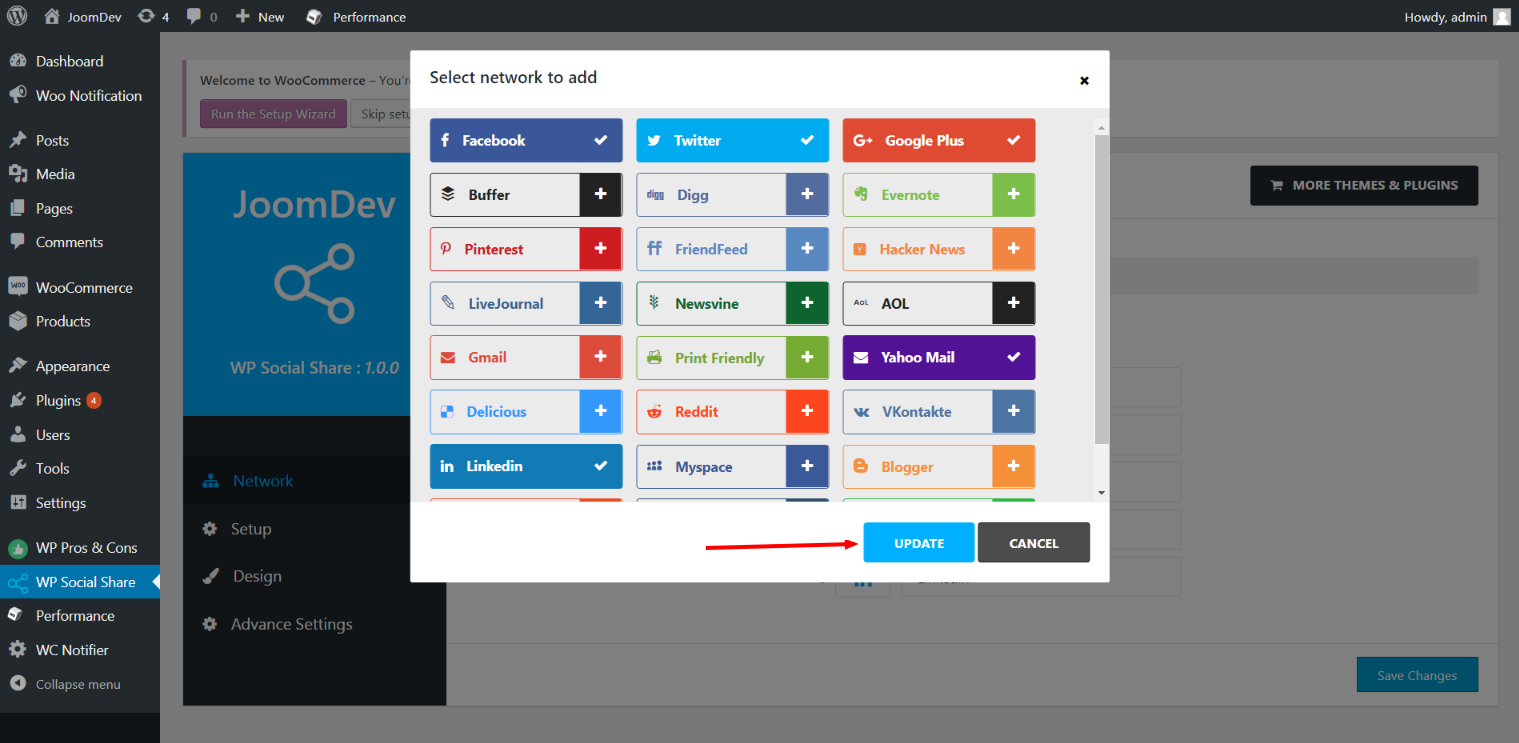
  • Click here to select networks
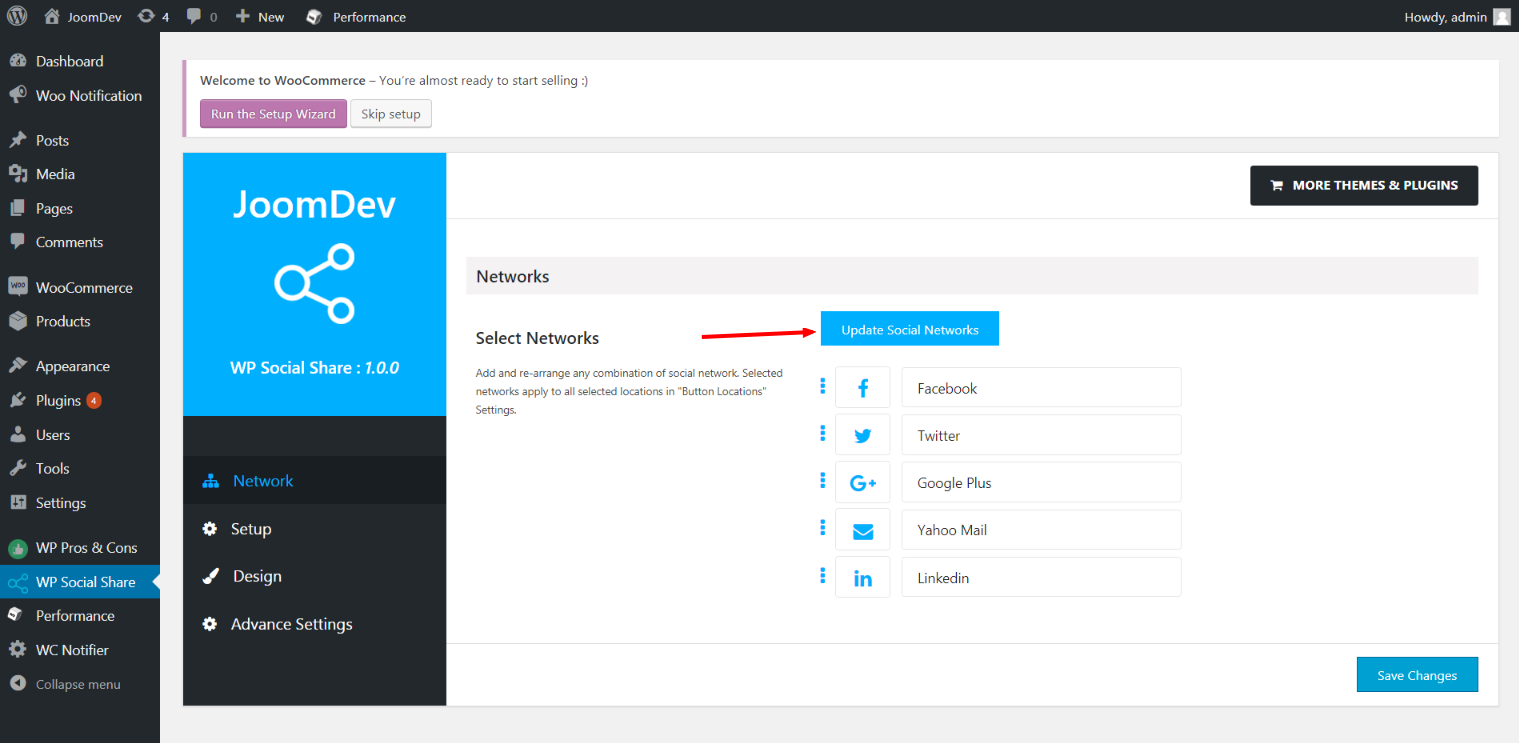
  • Update networks after selecting them.
  • Setup plugin and api settings.
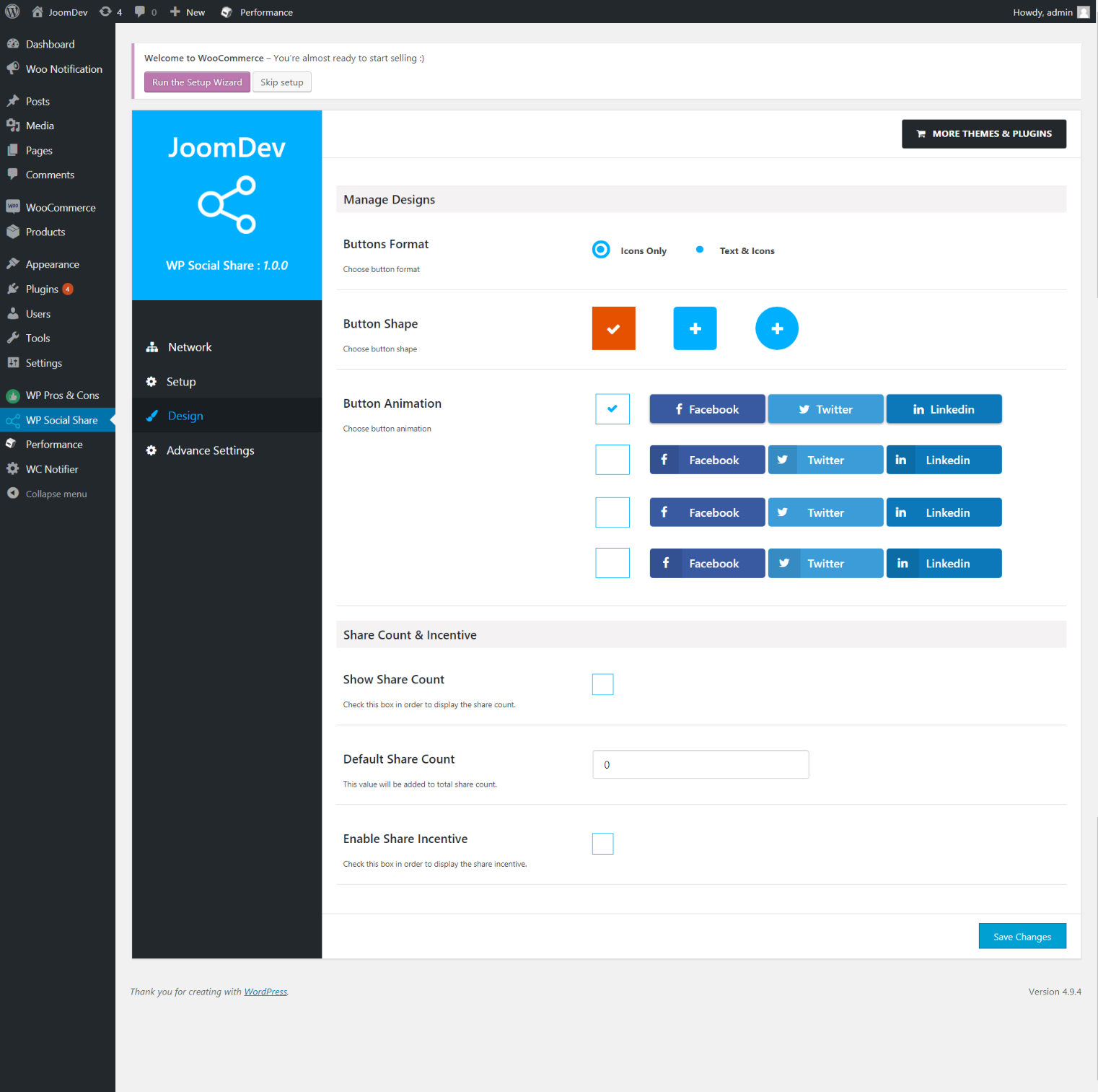
  • Select any design to display the buttons.
  • For mobile

دامەزراندن

Way 1:
1. Upload joomdev-wp-social-share.zip to the /wp-content/plugins/ directory
2. Extract the zip file.
3. Activate the plugin from wordpress plugins page. And you have done.

Way 2:
1. Go to plugins page in admin.
2. Click on Add New button.
3. Search for “WP ShareX”.
4. Click install on WP Social Share.
5. Activate the plugin.

پهد

Installation Instructions

Way 1:
1. Upload joomdev-wp-social-share.zip to the /wp-content/plugins/ directory
2. Extract the zip file.
3. Activate the plugin from wordpress plugins page. And you have done.

Way 2:
1. Go to plugins page in admin.
2. Click on Add New button.
3. Search for “WP ShareX”.
4. Click install on WP Social Share.
5. Activate the plugin.

How do I use this plugin?

See description.

پێداچوونەوەکان

Excellent!

Arnab Mohapatra ئازار 16, 2018 1 reply
Incredible plugin. It allows to add any sharing button on the page simply and fast!
خوێندنەوەی 1 پێداچوونەوە

بەشداربووان و گەشەپێدەران

“WP ShareX” نەرمەواڵەیەکی سەرچاوە کراوەیە. ئەم کەسانەی خوارەوە بەشدارییان تێدا کردووە.

بەشداربووان
  • joomdev

“WP ShareX” وەربگێڕە بۆ زمانەکەی خۆت.

دەتەوێت بەشداربیت لە گەشەپێدان؟

گەڕان لە کۆدەکەدا بکە، سەیری تەمارگەی (SVN) بکە، یان بەشداربە لە ڕووداوتۆماری گەشەپێدان لە ڕێگەی (RSS).

ڕووداوتۆمارگەریی گۆڕین

1.0.0

  • New Plugin initialized.

مێتا

  • وەشان 1.0.0
  • دوایین بەڕۆژکردنەوە 8 ساڵ لەمەوبەر
  • دامەزراندنی چالاک 10+
  • وەشانی وۆردپرێس 3.0 یان بەرزتر
  • تاقیکراوەتەوە تا 4.9.29
  • زمان
    English (US)
  • تاگەکان
    sharesocialsocial share
  • بینینی پێشکەوتوو

هەڵسەنگاندنەکان

5 out of 5 stars.
  • 1 5-star review 5 ئەستێرە 1
  • 0 4-star reviews 4 ئەستێرە 0
  • 0 3-star reviews 3 ئەستێرە 0
  • 0 2-star reviews 2 ئەستێرە 0
  • 0 1-star reviews 1 ئەستێرە 0

Your review

See all reviews

بەشداربووان

  • joomdev

پشتیوانی

هیچت هەیە بۆ وتن؟ پێویستت بە یارمەتییە؟

بینینی مەکۆی پاڵپشتی

ببەخشە

دەتەوێت پشتگیریی بەرەوپێشچوونی ئەم پێوەکراوە بکەیت؟

ببەخشە بەم پێوەکراوە

  • دەربارە
  • هەواڵەکان
  • خانەخوێکردن
  • تایبەتمەندێتی
  • پیشاندان
  • ڕووکاره‌کان
  • پێوه‌کراوه‌کان
  • شێوەئاساکان
  • فێربە
  • پاڵپشتی
  • گەشەپێدەران
  • WordPress.tv ↖
  • بەشداری بکە
  • بۆنەکان
  • بەخشین ↖
  • پێنج بۆ داهاتوو
  • WordPress.com ↖
  • Matt ↖
  • bbPress ↖
  • BuddyPress ↖
WordPress.org
WordPress.org

وۆردپرێس بەکوردی

  • Visit our X (formerly Twitter) account
  • Visit our Bluesky account
  • سەردانی هەژماری (Mastodon) بکە
  • Visit our Threads account
  • سەردانی پەڕەی فەیسبووکمان بکە
  • سەردانی هەژماری ئینستاگراممان بکە
  • سەردانی هەژماری لینکدئینمان بکە
  • Visit our TikTok account
  • سەردانی کەناڵەکەمان بکە لە یوتیوب
  • Visit our Tumblr account
کۆد هۆنراوەیە.
The WordPress® trademark is the intellectual property of the WordPress Foundation.