وەسف
Disable WordPress Plugins on Specific Pages and Posts
WP Plugin Manager is a free WordPress plugin that lets you turn off any plugin on the pages, posts, or custom post types where you don’t need it. A plugin that is turned off for a page does not load at all on that page, so its PHP code, database queries, and CSS/JS files are skipped for that request. Fewer plugins loading per page means less work for your server and usually faster pages.
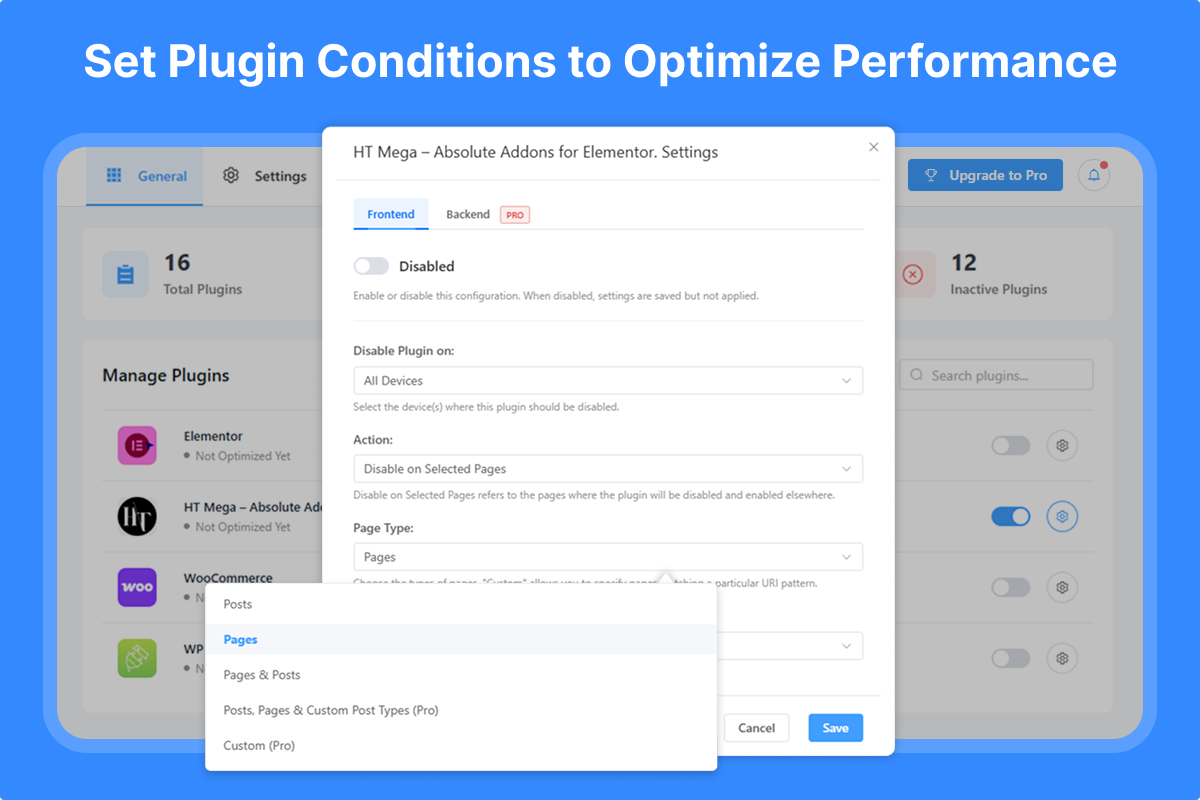
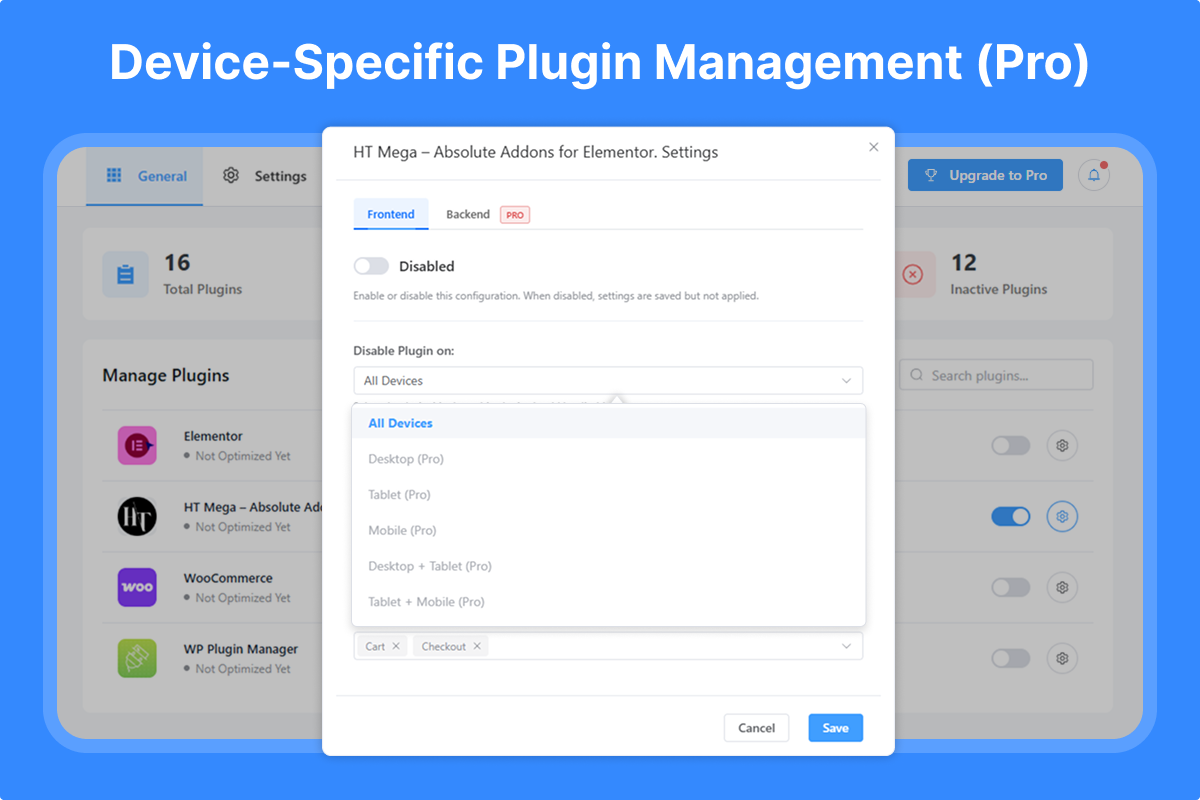
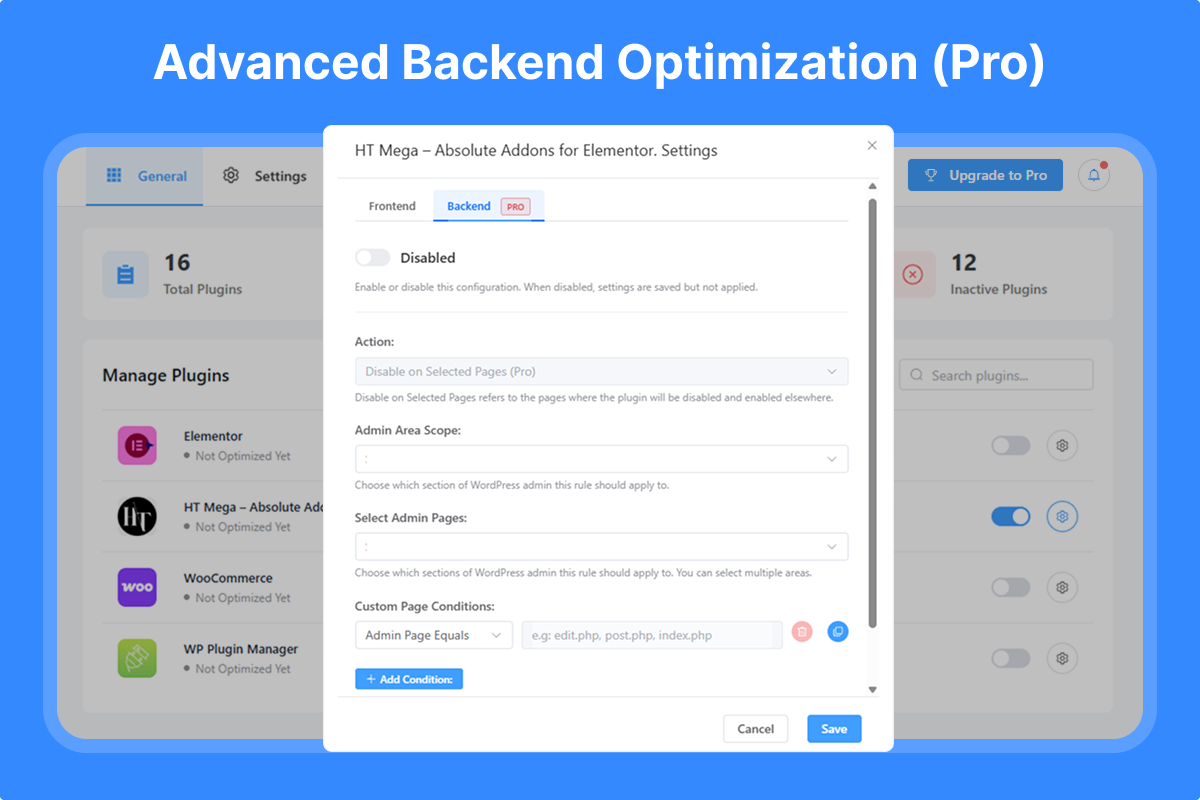
You choose a plugin, choose the pages or posts where it should not load, and save. Device-based rules (desktop, tablet, mobile) and admin-area rules are available in the Pro version.
Video: a walkthrough of setting up WP Plugin Manager and disabling a plugin on a chosen page.
🚀 Get Pro Version | 📹 Watch Video Tutorial | 📚 Documentation | 💬 Support
Why disable plugins on specific pages?
By default, every active WordPress plugin loads on every page, including pages that never use it. A contact form plugin loads on blog posts, a checkout plugin loads on your about page, and so on. This can lead to:
- Slower page load times
- Higher server resource usage
- Unneeded CSS and JavaScript on pages that don’t use it
WP Plugin Manager solves this by letting you disable plugins on the specific pages and posts where they’re not required.
Key Benefits
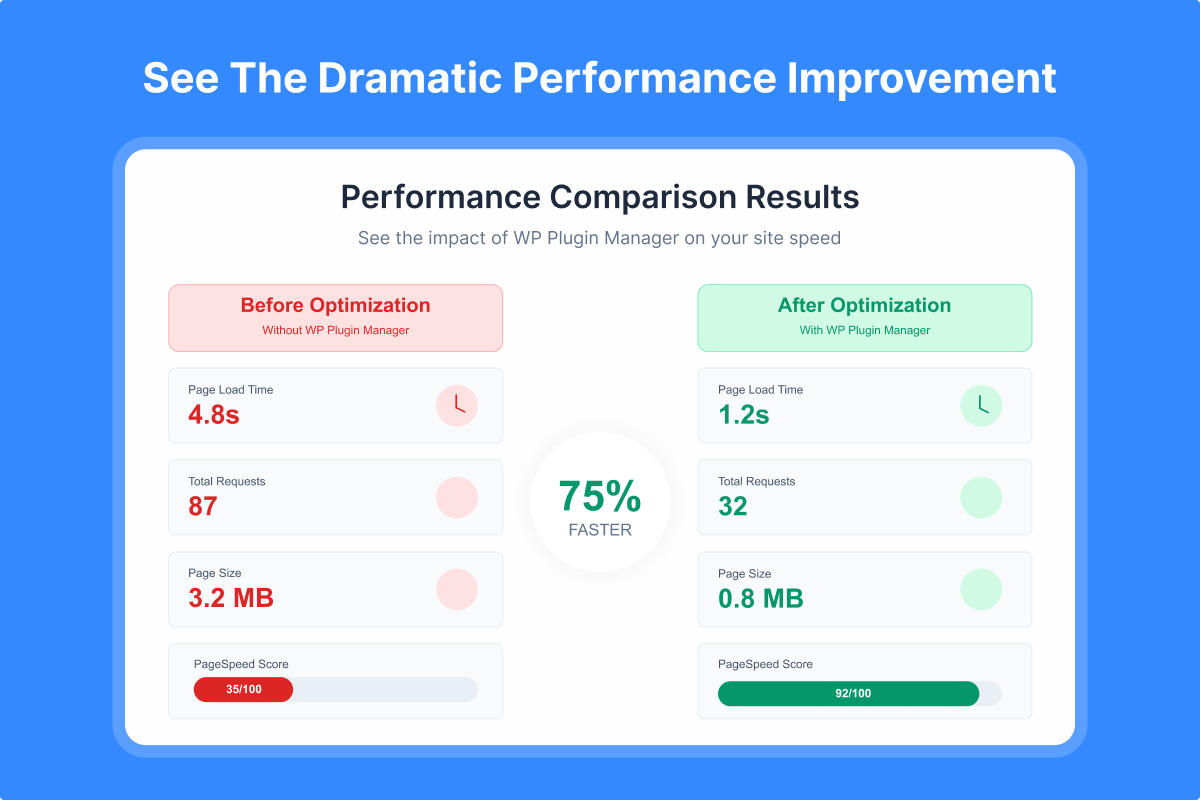
- Faster pages: Plugins that don’t load can’t slow a page down. Results depend on your site and which plugins you disable.
- Less server work: Skipped plugins mean fewer PHP calls and database queries per request.
- Simple control: Turn plugins off per page or post from one dashboard, with no code.
- Safe: Plugin files are never changed or deleted. Re-enable a plugin at any time.
- Device-specific rules (Pro): Different rules for desktop, tablet, and mobile.
How is WP Plugin Manager different from asset cleanup tools?
Asset cleanup tools remove individual CSS and JavaScript files from a page. WP Plugin Manager stops the entire plugin from loading on that page, so its PHP code and database queries are skipped too, not just its assets.
What WP Plugin Manager does not do
- It does not minify, combine, or delay CSS and JavaScript.
- It does not cache pages. Use it alongside a caching plugin if you need caching.
- It does not delete or modify other plugins’ files.
Core Features (Free Version)
Plugin Control
* Selectively disable any plugin on specific pages or posts
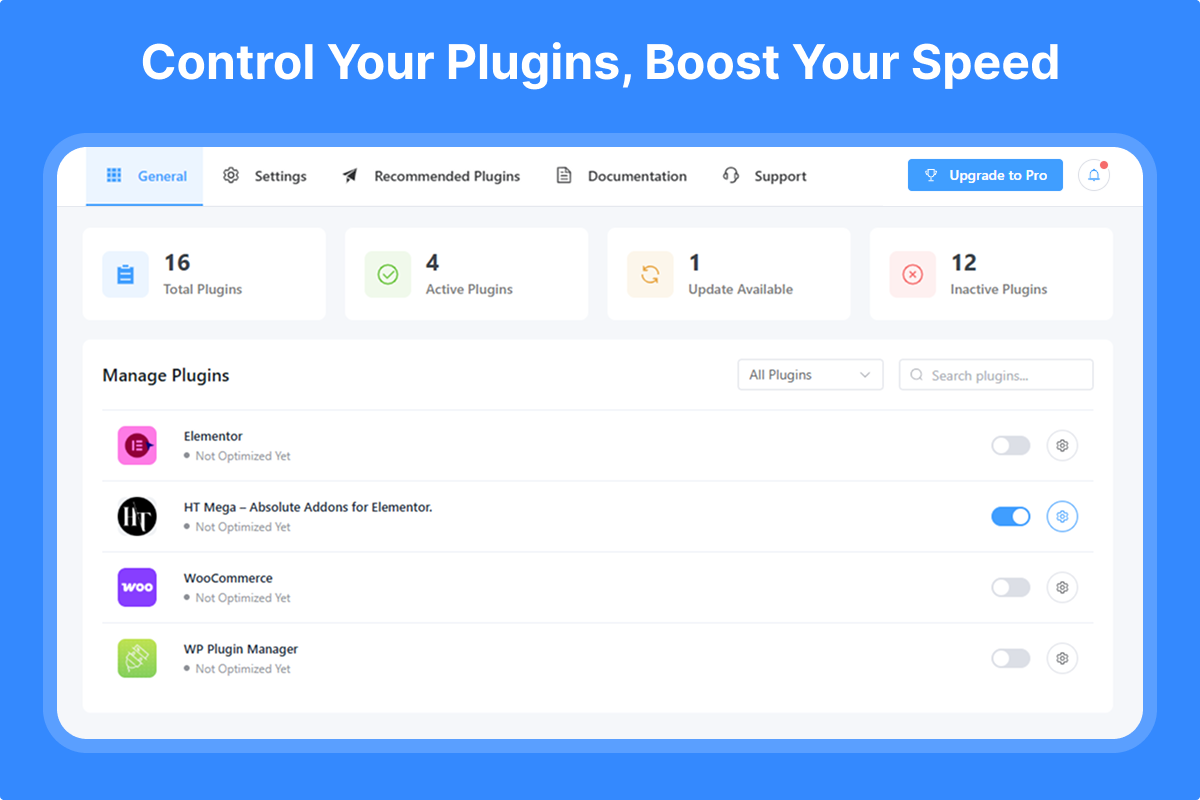
* Easy toggle switches for quick plugin management
* Visual dashboard showing all plugin statuses
* Search and filter plugins instantly
Page & Post Management
* Disable plugins on individual pages
* Disable plugins on specific posts
* Bulk selection for multiple pages/posts
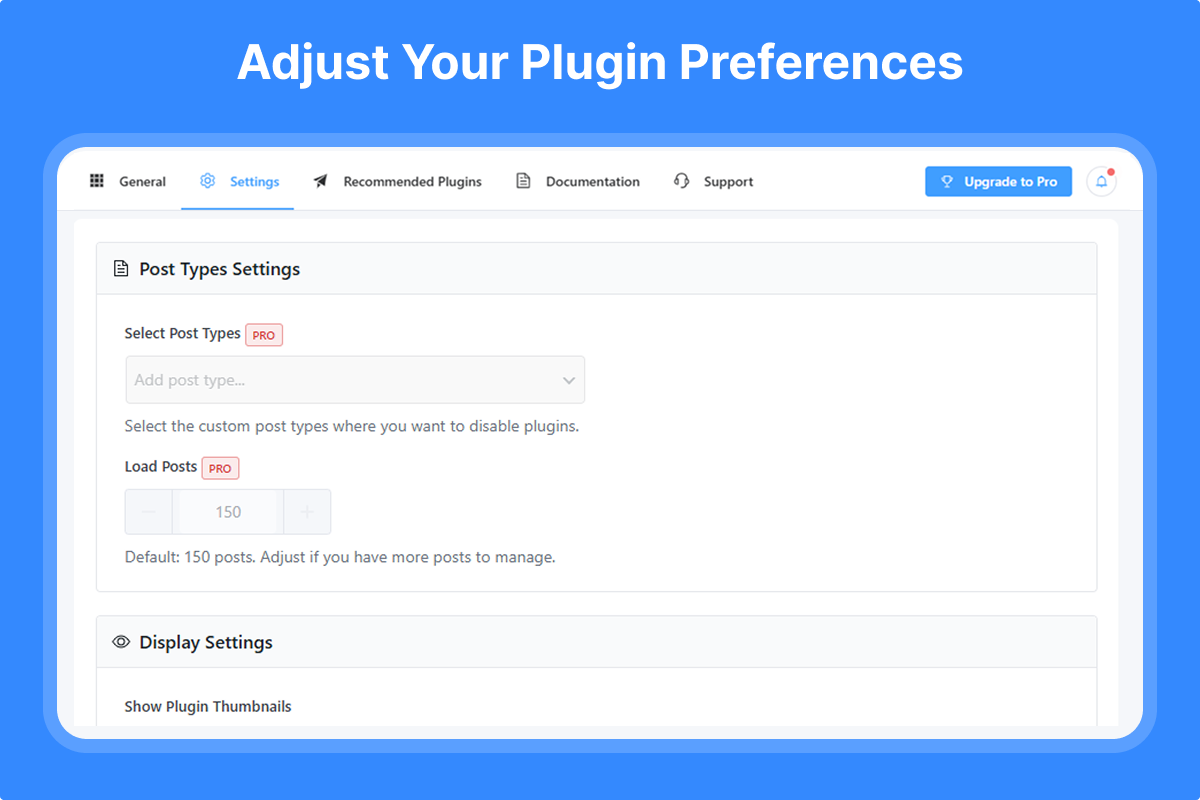
* Support for custom post types
Multisite Support
* Network Admin settings page for super admins
* Configure plugin rules once and apply them across every site in your network
* Override the network rules on individual sites when needed
* Network-activated plugins show up correctly in the plugin list
User-Friendly Interface
* Intuitive plugin management dashboard
* Clear visual indicators
* No coding required
* Lightweight and fast
Pro Features – Unlock All Features
Advanced Device Targeting
* Desktop-only rules
* Tablet-specific optimization
* Mobile-focused settings
* Combined device rules (Desktop + Tablet, etc.)
Backend/Admin Optimization
* Control plugins in WordPress admin area
* Specific admin page targeting
* Custom PHP file conditions
* Reduce admin panel load time
Advanced URL & Path Control
* Custom URL pattern matching
* Directory-based rules
Enhanced Features
* Enable plugins on selected pages (inverse logic)
* Extended post loading (manage 150+ posts)
* Multiple conditional rules
* Priority support
Why choose WP Plugin Manager?
- Easy to use: No technical knowledge required
- Safe: Doesn’t modify other plugins’ files
- Immediate effect: Rules apply as soon as you save
- Regular updates: Actively maintained
- Support: Help is available through our support team
Before and after WP Plugin Manager
Before:
* All active plugins load on every page
* CSS and JS from every plugin load on every page
After:
* Plugins load only on the pages where you need them
* Pages load only the CSS and JS they use
Who uses WP Plugin Manager?
- eCommerce Sites: Disable checkout plugins on blog pages
- Membership Sites: Control member-only plugin loading
- Business Websites: Optimize contact form plugin loading
- Blogs: Disable unnecessary plugins on article pages
- Portfolio Sites: Load gallery plugins only where needed
- Multisite Networks: Set plugin rules once for the whole network and fine-tune per site
Get started
Install WP Plugin Manager, pick a plugin you don’t need on every page, and turn it off where it isn’t used.
Need Help? Check our documentation or contact our support team.
Other Products
Explore our other WordPress solutions to enhance your website:
- 🛍️ WooLentor – Transform your WooCommerce store with 125+ widgets, 85+ Gutenberg blocks, 34+ Modules and 110+ templates. Features include wishlist, product compare, variation swatches, and multi-step checkout. The ultimate alternative to ShopReady, Kadence, and JetWidgets.
- 🎨 HT Mega – Supercharge Elementor with 135+ widgets, 795+ ready made blocks, header/footer builders, and mega menus. Create stunning websites with post grids, sliders, forms, and more. Works seamlessly like HappyAddons, ElementsKit and Essential Addons.
- 📢 HashBar – Create unlimited notification bars for announcements, promotions, and alerts. Fully customizable with multiple display options.
- 📧 Extensions for CF7 – Extend Contact Form 7 with database storage, conditional fields, and Mailchimp integration. Capture and manage leads effectively.
- 💼 Whols – Professional wholesale pricing solution for WooCommerce. Set wholesale prices, minimum requirements, and custom registration fields. Alternative to Wholesale Suite and B2Bking.
- 📊 JustTables – Display products in customizable tables with pre-built columns. Perfect for catalogs and bulk ordering.
- 🎨 Swatchly – Add beautiful color, image, and label swatches to product variations. Enhance the shopping experience with visual selection options.
- 🎯 HT Slider – Create responsive sliders with custom styling, navigation, and pagination options. Display content by ID or category.
- 📝 HT Contact Form – Seamlessly integrate Contact Form 7 with Elementor. Drag, drop, and style your forms with ease.
سکرین شۆتەکان
دامەزراندن
Automatic Installation (Recommended)
- Go to Plugins > Add New in your WordPress admin
- Search for “Plugin Manager”
- Click Install Now and then Activate
- Navigate to Plugin Manager in your admin menu
Manual Installation
- Download the plugin ZIP file
- Go to Plugins > Add New > Upload Plugin
- Choose the downloaded file and click Install Now
- Activate the plugin
- Find Plugin Manager in your WordPress admin menu
Multisite Installation
- Install the plugin from Network Admin > Plugins
- Click Network Activate
- Open Plugin Manager in the Network Admin menu to set rules for all sites
- Optionally, open Plugin Manager on an individual site to override the network rules for that site
First Steps
- After activation, visit the Plugin Manager dashboard
- Select a plugin you want to optimize
- Choose pages/posts where it should be disabled
- Configure device-specific rules (Pro)
- Save your settings and enjoy faster load times!
پهد
-
How do I disable a plugin on a specific page in WordPress?
-
- Install and activate WP Plugin Manager.
- Open Plugin Manager in your WordPress admin menu.
- Select the plugin you want to turn off.
- Choose the pages or posts where it should not load.
- Save your settings. The plugin no longer loads on those pages.
-
How does WP Plugin Manager work?
-
WP Plugin Manager adds a small must-use plugin file (htpm-mu-plugin.php) to your wp-content/mu-plugins folder. Must-use plugins load before regular plugins, so it can compare the current page URL with your rules and stop the matching plugins from loading for that request. Your rules are stored in the database, and other plugins’ files are never changed. Deleting WP Plugin Manager removes the file.
-
Will this break my website?
-
It shouldn’t. WP Plugin Manager only controls whether a plugin loads on the pages you choose, and it doesn’t modify any plugin files. If a page stops working correctly, re-enable the plugin for that page. Be careful with plugins that other plugins or your theme depend on.
-
Does it work with WordPress Multisite?
-
Yes. Network-activate the plugin, then open Plugin Manager in the Network Admin to set rules that apply to every site in your network. Individual sites can still set their own rules for a plugin, and a site’s own rule takes priority over the network rule for that plugin.
-
Who can manage the network-wide rules?
-
Only super admins. Site admins manage rules for their own site only.
-
Can I use WP Plugin Manager with caching plugins?
-
Yes. WP Plugin Manager works at the plugin-loading level, so it can be used alongside caching plugins. If a page is served from cache, clear the cache after changing your rules so the change shows up.
-
Does it replace a caching or speed optimization plugin?
-
No. It only controls which plugins load on a page. It does not cache pages or minify files.
-
Does it work with all plugins?
-
It can be used with most WordPress plugins. Security plugins and plugins that other parts of your site depend on should usually stay active on all pages.
-
Can I disable plugins in the admin area?
-
Yes, in the Pro version. The free version applies rules to the front end of your site.
-
Can I set different rules for mobile devices?
-
Yes, in the Pro version. Device-specific targeting lets you set different rules for desktop, tablet, and mobile.
-
Is there a performance impact from using this plugin?
-
The plugin is lightweight. Rules are checked once per page request, and plugins you disable on a page are not loaded on it.
-
How much faster will my site be?
-
It depends on your site and which plugins you disable. Disabling heavy plugins on pages that don’t use them gives the biggest gain. Test your pages before and after with a speed tool such as PageSpeed Insights or GTmetrix.
پێداچوونەوەکان


بەشداربووان و گەشەپێدەران
“WP Plugin Manager – Deactivate plugins per page” نەرمەواڵەیەکی سەرچاوە کراوەیە. ئەم کەسانەی خوارەوە بەشدارییان تێدا کردووە.
بەشداربووان


“WP Plugin Manager – Deactivate plugins per page” وەرگێڕدراوە بۆ 3 زمان. سوپاسی وەرگێڕەکان دەکەین بۆ بەشداریکردنیان.
“WP Plugin Manager – Deactivate plugins per page” وەربگێڕە بۆ زمانەکەی خۆت.
دەتەوێت بەشداربیت لە گەشەپێدان؟
گەڕان لە کۆدەکەدا بکە، سەیری تەمارگەی (SVN) بکە، یان بەشداربە لە ڕووداوتۆماری گەشەپێدان لە ڕێگەی (RSS).
ڕووداوتۆمارگەریی گۆڕین
Version: 1.4.17 Date: 06 October 2026
- Fixed: Restricted the recommended plugins endpoints to users who can manage plugins.
- Fixed: A few minor issues.
- Tested: Compatibility with the latest version of WordPress.
Version: 1.4.16 Date: 09 September 2026
- Added: Multisite support — configure plugin rules once at Network Admin level and apply them across every site, with the option to override on individual sites.
- Fixed: Plugins activated at the network level not appearing correctly in the plugin list.
- Fixed: “Optimize Now” quick action not disabling the plugin on the frontend by default.
- Fixed: Selected page/post targeting not matching correctly across different site domains.
- Tested: Compatibility with the latest version of WordPress.
Version: 1.4.15 Date: 23 August 2026
- Fixed: A few minor issues.
- Tested: Compatibility with the latest version of WordPress.
Version: 1.4.14 Date: 23 July 2026
- Fixed: A few minor issues.
- Tested: Compatibility with the latest version of WordPress.
Version: 1.4.13 Date: 17 June 2026
- Fixed: Post type select dropdown in Settings page now hides already-selected items from the list.
- Tested: Compatibility with the latest version of WordPress.
Version: 1.4.12 Date: 25 March 2026
- Fixed: Plugin incorrectly disabled on child pages when parent page was selected.
- Fixed: “All Pages” now applies to homepage and child pages.
- Fixed: “All Posts” incorrectly firing on homepage.
- Fixed: Individual post URL matching not working.
Version: 1.4.11 Date: 26 February 2026
- Improved: Admin notice display.
Version: 1.4.10 Date: 01 January 2026
- Fixed: A few minor issues.
- Tested: Compatibility with the latest version of WordPress.
Version: 1.4.9 Date: 13 November 2025
- Fixed: Admin notice display issue.
Version: 1.4.8 Date: 11 November 2025
- Improved: Code cleanup – removed unused legacy code from migration to REST API.
Version: 1.4.7 Date: 23 October 2025
- Improved: Minor UI update and optimizations.
Version: 1.4.6 Date: 07 September 2025
- Updated: Language translation .pot file.
- Fixed: API request status content translation issues.
- Fixed: A few minor issues.
Version: 1.4.5 Date: 24 August 2025
- Updated: Language translation .pot file.
- Fixed: String translation issue.
- Fixed: A few minor issues.
Version: 1.4.4 Date: 11 August 2025
- Improved: Manage plugin list Style.
- Fixed: Plugin Enable/Disable Confirm popup issue in Manage Plugin List.
- Fixed: A few minor issues.
Version: 1.4.3 Date: 29 July 2025
- Updated: Language translation .pot file.
- Fixed: Infinite loading issue when an error occurs while fetching the plugin list.
- Fixed: A few minor issues.
Version: 1.4.2 Date: 14 July 2025
- Improved: Disabled WP Plugin Manager plugin from Manage Plugin List.
- Fixed: A few minor issues.
Version: 1.4.1 Date: 15 June 2025
- Added: Filter Option to optimized, Not Yet Optimized, Frontend Optimized and all plugins.
- Fixed: A few minor issues.
Version: 1.4.0 Date: 21 May 2025
- Improved: UI/UX for better user experience.
- Tested: Compatibility with the latest version of WordPress.
Version: 1.3.1 Date: 17 April 2025
- Updated: Language translation .pot file.
Version: 1.3.0 Date: 17 April 2025
- Updated: Plugin text domain for improved translation support.
- Tested: Compatibility with the latest version of WordPress.
Version: 1.2.9 Date: 09 February 2025
- Improved: User interface for better user experience.
Version: 1.2.8 Date: 03 December 2024
- Added: Option to disable/enable plugin in all Page/Post/Custom Post Type.
- Fixed: “Select Pages” and “Select Posts” options do not appear after selecting “Page & Post” for the “Page Type” setting.
Version: 1.2.7 Date: 04 November 2024
- Enhanced: UI/UX for a better user experience
Version: 1.2.6 Date: 03 September 2024
- Fixed: Escaping issues have been resolved in recommended plugins.
- Improved: Coding standards in some areas.
- Updated: Language translation .pot file.
Version: 1.2.5 Date: 30 July 2024
- Fixed: Escaping issues have been resolved in multiple areas.
Version: 1.2.4 Date: 02 July 2024
- Fixed: Translation issue in multiple areas.
- Updated: Language translation .pot file
Version: 1.2.3 Date: 03 June 2024
- Tweak: Opt-in message to provide non-sensitive diagnostic data.
Version: 1.2.2 Date: 18 Feb 2024
- Updated: Language translation file.
- Fixed: Undefined array key “condition_type” & “device_type” in mu plugin file.
- Tweak: A few enhancements on the settings page.
Version: 1.2.1 Date: 14 Jan 2024
- Fixed: Undefined index HTTP_HOST issue when run on cron job
Version: 1.2.0 Date: 26 Oct 2023
- Fixed: Ajax Request issue
Version: 1.1.9 Date: 06 July 2023
- Updated: Translation Pot file
Version: 1.1.8 Date: 27 Feb 2023
- Fixed: Nonce issue while activating plugin
Version: 1.1.7 Date: 07 Nov 2022
- Capability With the Latest WordPress Version
Version: 1.1.6 Date: 27 Sep 2022
- Updated: Plugin list in the Recommendations menu
- Capability With Latest WordPress Version
Version: 1.1.5 Date: 07 March 2022
- Improved: Typo and button
Version: 1.1.4 Date: 23 Dec 2021
- Improved: MU file function
Version: 1.1.3 Date: 04 Oct 2021
- Improved: Enqueueing JS/CSS file by adding version number considering caching problem
Version: 1.1.2 Date: 08 Sep 2021
- Updated: Translation Pot file
Version: 1.1.1 Date: 12 Aug 2021
- Fixed: Plugin does not activate issue
Version: 1.1.0 Date: 26 Jul 2021
- Added: Posts limit support
- Fixed: Notice button CSS
Version: 1.0.9 Date: 26 Jun 2021
- Fixed: Warning on plugin activation
- Added: message when no plugin is active
Version: 1.0.8 Date: 03 Jun 2021
- Fixed: Recommended plugins class
Version: 1.0.7 Date: 02 Jun 2021
- Moved the submenu to menu page
- Added: recommended plugins
Version: 1.0.5 Date: 06-01-2021
- Capability With Latest WordPress Version
Version: 1.0.4 Date: 5-30-2020
- Plugins Tab Added
Version: 1.0.3 Date: 4-26-2020
- Compatible with the Latest WordPress version
Version: 1.0.2 Date: 3-07-2020
- Compatible with the Latest PHP version
- Add setting page link in plugin menu action
- MU-Plugin directory remove option added
- Suppress errors has been solved
- Free and pro both activation broken issues solved
Version: 1.0.1 Date: 2-01-2020
- Plugin deactivation on the home page added
- New plugin activation issue fixed
Version: 1.0.0
- Initial Release