

وەسف
This plugin works in a very simple way allowing you to save the users that have logged in to your wodpress page from your computer, giving them a quick access to your user account when they return again and no less important style to the wordpress login
سکرین شۆتەکان
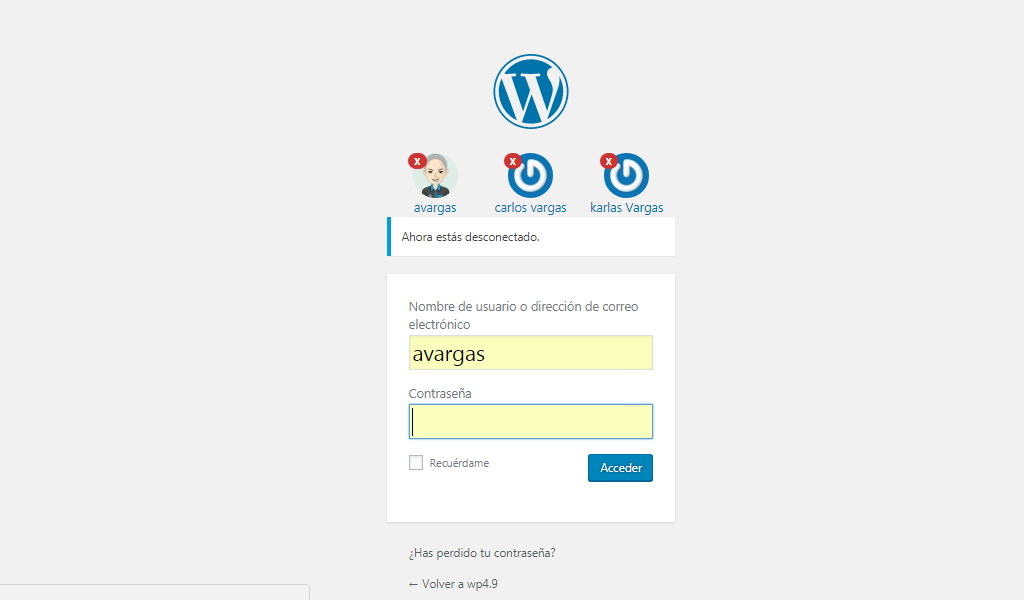
When you start a session with a wordpress account, this logged-in user is saved and when you close the session you can view it as shown in the screenshot, thus clicking on the avatar will insert the user name in the field but not the password. security
دامەزراندن
You can either install it automatically from the WordPress admin, or do it manually:
Using the Plugin Manager
- Click Plugins
- Click Add New
- Search for
Session Save User - Click Install
- Click Install Now
- Click Activate Plugin
Manually
- Upload
session-save-userfolder to the/wp-content/plugins/directory - Activate the plugin through the ‘Plugins’ menu in WordPress
پهد
- Installation Instructions
-
You can either install it automatically from the WordPress admin, or do it manually:
Using the Plugin Manager
- Click Plugins
- Click Add New
- Search for
Session Save User - Click Install
- Click Install Now
- Click Activate Plugin
Manually
- Upload
session-save-userfolder to the/wp-content/plugins/directory - Activate the plugin through the ‘Plugins’ menu in WordPress
پێداچوونەوەکان

تشرینی دووهم 30, 2017
Funcional mente en la ultima version de WP (Y)

تشرینی دووهم 30, 2017
Me alegra mucho esta idea, buena iniciativa, me agrada una de las cosas necesarias. Gracias a estos aporte podemos seguir avanzando.

تشرینی دووهم 29, 2017
Excelente, muchas gracias.

تشرینی دووهم 29, 2017
Is a Good Plugin for Login Facility

تشرینی دووهم 29, 2017
1 reply
Felicitaciones Daniel, muy util!
بەشداربووان و گەشەپێدەران
“Session Save User” نەرمەواڵەیەکی سەرچاوە کراوەیە. ئەم کەسانەی خوارەوە بەشدارییان تێدا کردووە.
بەشداربووان
“Session Save User” وەربگێڕە بۆ زمانەکەی خۆت.
دەتەوێت بەشداربیت لە گەشەپێدان؟
گەڕان لە کۆدەکەدا بکە، سەیری تەمارگەی (SVN) بکە، یان بەشداربە لە ڕووداوتۆماری گەشەپێدان لە ڕێگەی (RSS).
ڕووداوتۆمارگەریی گۆڕین
1.1
First approach to Session Save User.