

وەسف
Pagora AI is an AI-powered page builder for WordPress. Instead of dragging and dropping blocks, simply describe the page you want — the AI generates complete HTML/CSS/JS code that you can refine by continuing the conversation or editing directly in the code panel.
Key features
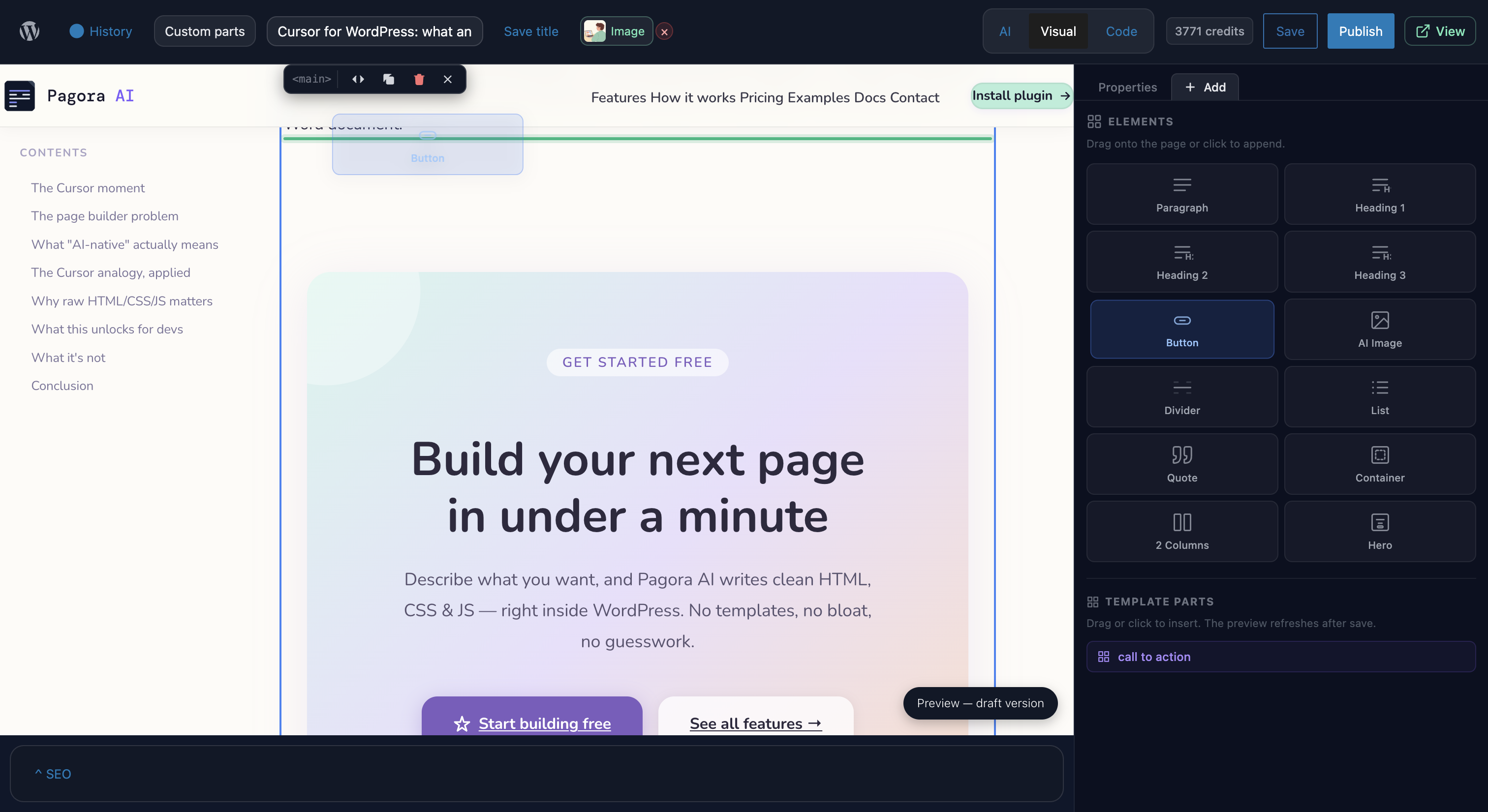
- AI chat — describe your page in plain language; the AI produces complete HTML/CSS/JS with animations and UnoCSS utility styles (Tailwind syntax).
- Code editor — built-in CodeMirror editor with HTML/CSS/JS syntax highlighting, auto-formatting, and keyboard shortcuts.
- Live preview — isolated iframe preview that updates instantly after every edit or AI response.
- Version history — every save creates a snapshot; restore any version in one click.
- AI images — generate and insert images directly from the editor.
- SEO panel — title, meta description, and featured image controls per page.
- Templates — save your pages as reusable templates.
- Alpine.js + Motion One bundled — declarative interactivity and smooth animations with no extra dependencies.
How it works
This plugin is a client for the Pagora AI service. No AI model runs locally.
- Install and activate the plugin.
- Create an account at pagora-ai.com and connect it from Settings Pagora AI.
- Open any WordPress page and click Edit with Pagora AI to open the editor.
- Describe your page in the chat and publish.
Data and privacy
This plugin connects exclusively to the Pagora AI service (https://api.pagora-ai.com) to process your prompts and generate page code. No data is sent to any other third party.
- Prompts and generated code transit through our servers for processing.
- See our Privacy Policy and Terms of Service.
- The plugin collects no telemetry of its own.
Bundled libraries
The following libraries are included in the plugin (all GPL-compatible):
- UnoCSS Runtime — MIT
- Alpine.js — MIT
- Motion One — MIT
- CodeMirror — MIT
- Symfony DomCrawler / CssSelector — MIT (isolated via php-scoper)
- Masterminds HTML5-PHP — LGPL-2.1
Source code and build instructions
The JavaScript and CSS bundles included in this plugin are compiled from TypeScript/TSX source files. The full, unminified source is publicly available at:
https://github.com/Enkic/pagora-ai-plugin
To build from source:
- Clone the repository.
- Run
npm installto install dependencies. - Run
npm run buildto compile all bundles intoassets/build/andassets/editor/build/.
Build tool: Webpack (via @wordpress/scripts). Node 18+ required.
سکرین شۆتەکان


دامەزراندن
- Download the ZIP and upload it via Plugins Add New Upload Plugin, or extract it into
/wp-content/plugins/. - Activate the plugin from the Plugins menu.
- Go to Settings Pagora AI and connect your account.
- On any page, click Edit with Pagora AI in the page list.
پهد
-
Do I need an account to use the plugin?
-
Yes. The plugin is a client for the Pagora AI service. An account is required to access the AI.
-
What kind of content can I create?
-
The plugin generates complete pages in HTML/CSS/JS. It supports UnoCSS utility classes (Tailwind syntax), Alpine.js for interactivity, and Motion One for animations.
-
Will Pagora AI break my theme?
-
No. The plugin creates standalone pages that replace theme rendering only on pages where you have explicitly activated Pagora AI. Your theme stays intact.
-
What WordPress capabilities are required?
-
Access to the editor requires the
unfiltered_htmlcapability (typically Administrators and Super Administrators). Settings management requiresmanage_options. -
Are Pagora AI pages compatible with caching plugins?
-
Yes. Compiled assets are stored with hashed filenames in
wp-content/uploads/pagora-ai/. The plugin includes cache purge integrations for WP Rocket, W3 Total Cache, and LiteSpeed Cache. -
What happens if I deactivate the plugin?
-
Pages created with Pagora AI will display their content normally via the active theme. Deactivating the plugin suspends the custom rendering but no data is lost.
-
What does uninstalling remove?
-
Uninstalling (
uninstall.php) removes all plugin options, page metadata, user tokens, and generated asset files inuploads/pagora-ai/. The WordPress page content itself is preserved.
پێداچوونەوەکان
هیچ پێداچوونەوەیەک نەنووسراوە بۆ ئەم پێوەکراوە.
بەشداربووان و گەشەپێدەران
“Pagora AI” نەرمەواڵەیەکی سەرچاوە کراوەیە. ئەم کەسانەی خوارەوە بەشدارییان تێدا کردووە.
بەشداربووان
“Pagora AI” وەربگێڕە بۆ زمانەکەی خۆت.
دەتەوێت بەشداربیت لە گەشەپێدان؟
گەڕان لە کۆدەکەدا بکە، سەیری تەمارگەی (SVN) بکە، یان بەشداربە لە ڕووداوتۆماری گەشەپێدان لە ڕێگەی (RSS).
ڕووداوتۆمارگەریی گۆڕین
1.0.0
- Initial public release.
- Full AI editor with chat, live preview, and code editor.
- Version management and snapshots.
- AI image generation and insertion.
- Built-in SEO panel.
- Reusable template system.
- Alpine.js, Motion One, and UnoCSS bundled for generated pages.
- Complete REST API under
pagora-ai/v1/. - Cache purge integrations (WP Rocket, W3TC, LiteSpeed).
1.0.1
- Credit system updates