

وەسف
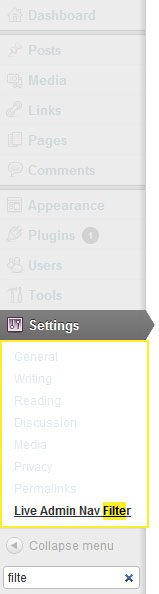
Add a search box to the admin nav that allows you to more easily find that menu item you can’t see at a glance.
Features
- Quickly and easily find what you’re looking for.
- Keyboard navigation friendly (hit
/to focus the search field, use theupanddownkeys to select the menu item you’re after, hit theenterkey to go to the selected menu item) - Customizable border and highlight colours.
سکرین شۆتەکان


دامەزراندن
- Upload the
live-admin-nav-filterfolder to your/wp-content/plugins/directory. - Activate the plugin through the
Pluginsmenu in WordPress. - You should now see a search box below the
collapse menubutton in the admin menu.
پێداچوونەوەکان
هیچ پێداچوونەوەیەک نەنووسراوە بۆ ئەم پێوەکراوە.
بەشداربووان و گەشەپێدەران
“Live Admin Navigation Filter” نەرمەواڵەیەکی سەرچاوە کراوەیە. ئەم کەسانەی خوارەوە بەشدارییان تێدا کردووە.
بەشداربووان
“Live Admin Navigation Filter” وەربگێڕە بۆ زمانەکەی خۆت.
دەتەوێت بەشداربیت لە گەشەپێدان؟
گەڕان لە کۆدەکەدا بکە، سەیری تەمارگەی (SVN) بکە، یان بەشداربە لە ڕووداوتۆماری گەشەپێدان لە ڕێگەی (RSS).
ڕووداوتۆمارگەریی گۆڕین
1.0.1
- Bug Fixes
1.0
- Initial Release