

وەسف
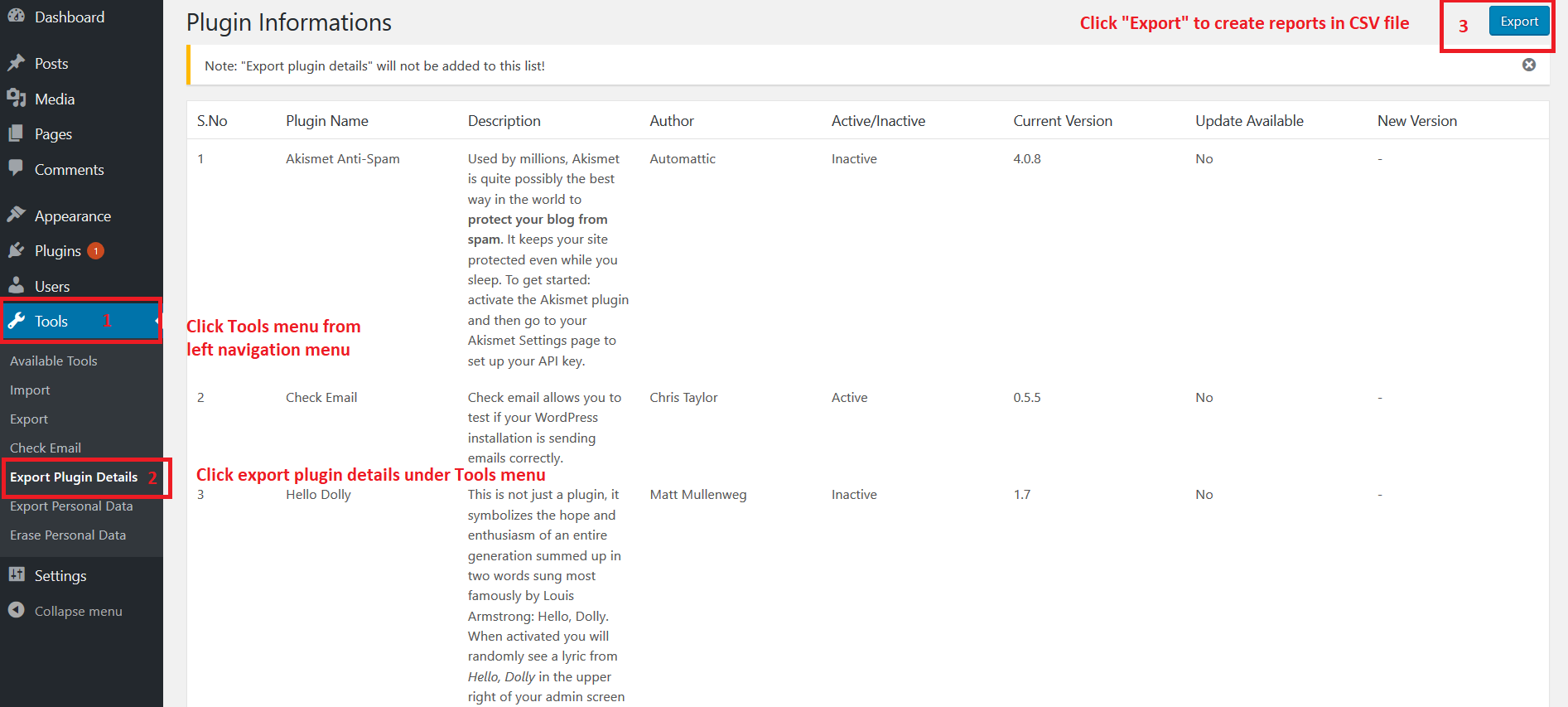
This plugin allows you to export your installed plugin list in CSV format. CSV file having the following fields
- Plugin Name
- Description
- Author
- Active/Inactive
- Current Version
- Update Available(Yes/No)
- New Version
Kindly let us know your feedback or comments to add more features in this plugin.
سکرین شۆتەکان
دامەزراندن
- Log in to your WordPress admin panel and go to Plugins -> Add New
- Type Export Plugin Details in the search box and click on search button.
- Find Export Plugin Details plugin.
- Then click on Install Now after that activate the plugin.
پێداچوونەوەکان

کانوونی دووەم 29, 2026
I use this all the time when I need to review all the plugins or document what is on the site. Works like a charm. Thanks for the plugin.

تشرینی دووەم 2, 2025
excellent simple plugin.
I usually do not write reviews for plugins, but I have tried this plugin for several years and I find it very helpful.
I hope we can bring more attention to it from the WP community.

تشرینی یەکەم 22, 2025
I tend to have to write plugin audits for clients and they can be really time consuming to do by hand. This plugin saves me so much time. I only wish I had found this plugin sooner.
Huge thank you to you for this plugin Boopathi Rajan!

تشرینی یەکەم 1, 2024
Nice work on this plugin.

ئاب 29, 2023
1 reply
Excellent… awesome… incredible… plugin

ئازار 9, 2023
Thank you very much for creating this unique and free plugin! It's so perfect as is. 2 suggestions if you decide to extend its abilities:Version of Wordpress and a similar list of themes could be included.
بەشداربووان و گەشەپێدەران
“Export Plugin Details” نەرمەواڵەیەکی سەرچاوە کراوەیە. ئەم کەسانەی خوارەوە بەشدارییان تێدا کردووە.
بەشداربووان
“Export Plugin Details” وەربگێڕە بۆ زمانەکەی خۆت.
دەتەوێت بەشداربیت لە گەشەپێدان؟
گەڕان لە کۆدەکەدا بکە، سەیری تەمارگەی (SVN) بکە، یان بەشداربە لە ڕووداوتۆماری گەشەپێدان لە ڕێگەی (RSS).