
وەسف
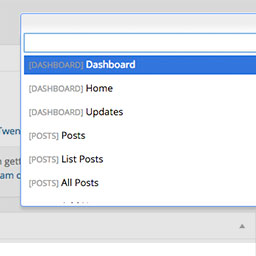
Dashy gives you a search field to get to admin pages quicker. More keyboard shortcuts right inside of WordPress. Get to pages, post, plugins, custom post types, faster. You can even search and get a to single post with the keyboard. To activate, use Control+Space.
To get to a specific page, type “list” and choose “List Pages”. From there you will be showing all of your pages that you can edit. Start searching the page name, and hit enter to go directly to editing that page. This supports posts, pages, and custom post types.
سکرین شۆتەکان


دامەزراندن
- Upload ‘dashy’ to the
/wp-content/plugins/directory - Activate the plugin through the ‘Plugins’ menu in WordPress
- Press Control+Shift+D to activate.
پێداچوونەوەکان
هیچ پێداچوونەوەیەک نەنووسراوە بۆ ئەم پێوەکراوە.
بەشداربووان و گەشەپێدەران
“Dashy” نەرمەواڵەیەکی سەرچاوە کراوەیە. ئەم کەسانەی خوارەوە بەشدارییان تێدا کردووە.
بەشداربووان
“Dashy” وەربگێڕە بۆ زمانەکەی خۆت.
دەتەوێت بەشداربیت لە گەشەپێدان؟
گەڕان لە کۆدەکەدا بکە، سەیری تەمارگەی (SVN) بکە، یان بەشداربە لە ڕووداوتۆماری گەشەپێدان لە ڕێگەی (RSS).