
وەسف
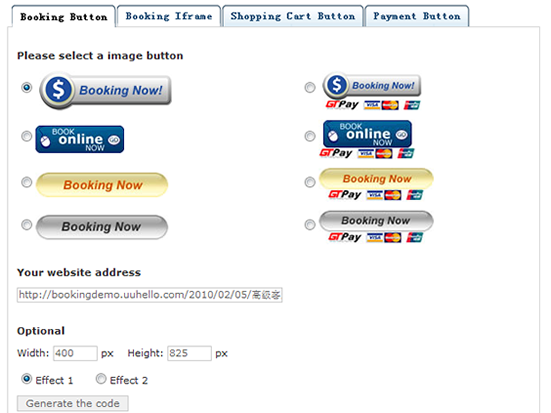
Easy and simple create booking, shopping cart, payment plugin code, just copy and paste to your website
Widget
In the Appearance -> Widgets in WordPress 2.8 or newer you’ll find the button generator widget. After adding it to your sidebar you can enter a title for the Widget, some descriptive text that will appear above the button and specify an optional purpose and reference for the donation button to override the default settings.
سکرین شۆتەکان

دامەزراندن
Install
- Upload the ‘button-generator’ folder to the ‘/wp-content/plugins/’ directory.
- Activate the plugin through the ‘Plugins’ menu in WordPress.
- Go to Settings -> button generator and start entering your info.
Uninstall
- Deactivate button generator in the ‘Plugins’ menu in WordPress.
- After Deactivation a ‘Delete’ link appears below the plugin name, follow the link and confim with ‘Yes, Delete these files’.
- This will delete all the plugin files from the server as well as erasing all options the plugin has stored in the database.
پهد
- Link
-
More details http://button.uuhello.com
پێداچوونەوەکان
هیچ پێداچوونەوەیەک نەنووسراوە بۆ ئەم پێوەکراوە.
بەشداربووان و گەشەپێدەران
“Button Generator” نەرمەواڵەیەکی سەرچاوە کراوەیە. ئەم کەسانەی خوارەوە بەشدارییان تێدا کردووە.
بەشداربووان
“Button Generator” وەربگێڕە بۆ زمانەکەی خۆت.
دەتەوێت بەشداربیت لە گەشەپێدان؟
گەڕان لە کۆدەکەدا بکە، سەیری تەمارگەی (SVN) بکە، یان بەشداربە لە ڕووداوتۆماری گەشەپێدان لە ڕێگەی (RSS).
ڕووداوتۆمارگەریی گۆڕین
1.0
- First version