

وەسف
A plugin that adds three columns to the listing of your articles on your administration. It shows the number of +1, tweets and facebook likes for every post. Like this you quickly see which post received a lot of social attention.
No settings required, just activate the plugin and browse your posts : /wp-admin/edit.php
The plugin does not keep the social count in memory to save speed and to always be up to date.
سکرین شۆتەکان
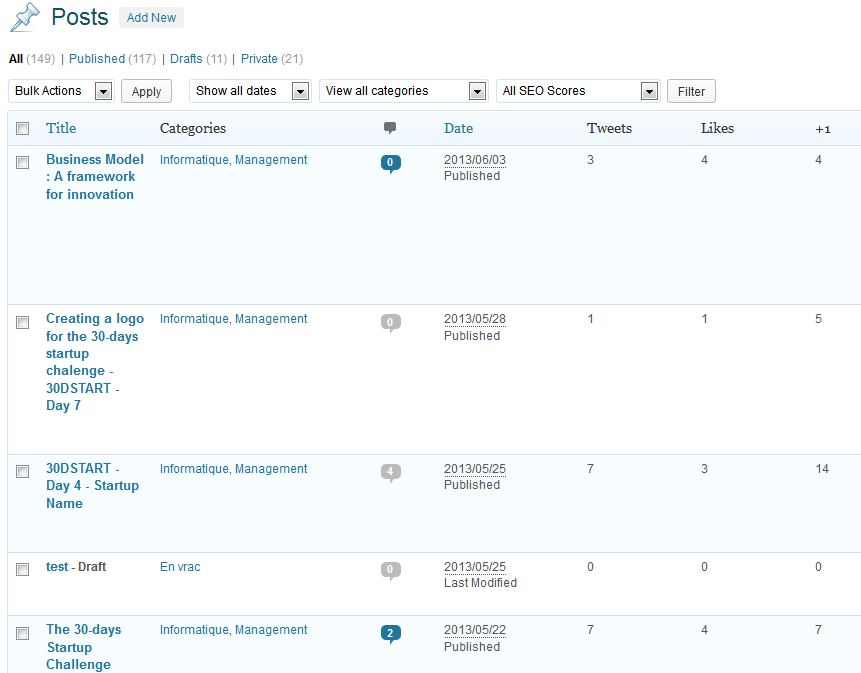
دامەزراندن
This section describes how to install the plugin and get it working.
- Upload the plugin to
/wp-content/plugins/directory - Activate the plugin through the ‘Plugins’ menu in WordPress
- Visit the listing of your posts :
/wp-admin/edit.php
پهد
- Which social metric do I see ?
-
At the moment, we show only the number of facebook likes, the number of retweets and the number of Google+ +1. The list might be extended in the future.
- Can I add special social networks metrics?
-
This will be done in the future releases.
- I do see the columns, but I don’t see any number, what’s the problem ?
-
The plugin needs you to have Javascript activated. This is how the ‘shares’ are collected. So, if you don’t see any number appearing (like those in the screenshot), try to check that your javascript works.
- Can I contribute to this ‘wonderful’ plugin?
-
Of course and you are welcome.
If you are a programmer you can fork me on : https://github.com/tanzaho/wp-admin-social-sharesIf you have any recommendations, feel free to use the the ‘support’ page on WordPress to submit them (https://wordpress.org/support/plugin/admin-social-shares)
You can also rate the plugin if you like it.
پێداچوونەوەکان
هیچ پێداچوونەوەیەک نەنووسراوە بۆ ئەم پێوەکراوە.
بەشداربووان و گەشەپێدەران
“WordiZ – Admin Social Shares” نەرمەواڵەیەکی سەرچاوە کراوەیە. ئەم کەسانەی خوارەوە بەشدارییان تێدا کردووە.
بەشداربووان
“WordiZ – Admin Social Shares” وەربگێڕە بۆ زمانەکەی خۆت.
دەتەوێت بەشداربیت لە گەشەپێدان؟
گەڕان لە کۆدەکەدا بکە، سەیری تەمارگەی (SVN) بکە، یان بەشداربە لە ڕووداوتۆماری گەشەپێدان لە ڕێگەی (RSS).
ڕووداوتۆمارگەریی گۆڕین
1.1
- First upload of the plugin