

وەسف
Adds easy to configure Elementor widgets specific for the restaurant industry.
Available elements
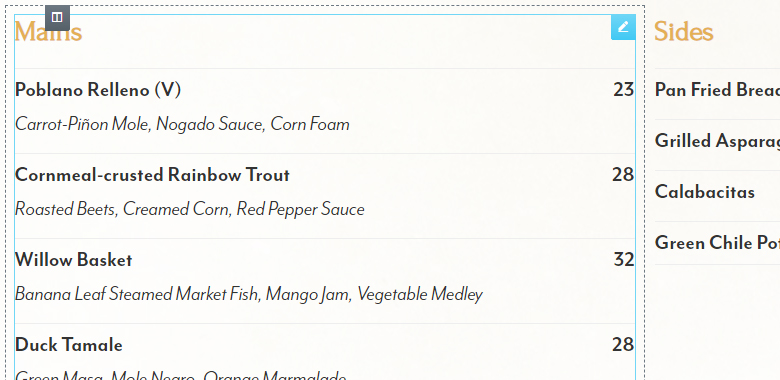
- Restaurant Menu widget: easy to configure restaurant menu widget for displaying restaurant menus
- OpenTable Reservation widget: easily add the official OpenTable Reservation widget without hassle
- More elements coming soon
Coming soon
- EventBrite Widget
- Schema markup for menus – Schema.org/Menu
سکرین شۆتەکان



دامەزراندن
Note : This plugin is an addon for Elementor. Make sure you have Elementor installed.
- Upload the plugin folder to the “/wp-content/plugins/” directory, or install the plugin through the WordPress plugins screen directly.
- Activate the plugin through the “Plugins” screen in WordPress.
- You can find the elements/widgets under the category “Restaurant Addon” on your Elementor elements list.
پهد
- Can I use the plugin without Elementor Page Builder?
-
No. You cannot use it without Elementor since it’s an addon for Elementor.
- Does it work with any theme?
-
Yes, it will work with any theme where Elementor works.
- Can I style the elements myself?
-
Yes, the basic styling of the elements is very minimal and only for basic layout purposes. Things such as font size, color etc will be inherited.
پێداچوونەوەکان
هیچ پێداچوونەوەیەک نەنووسراوە بۆ ئەم پێوەکراوە.
بەشداربووان و گەشەپێدەران
“Restaurant Addon for Elementor” نەرمەواڵەیەکی سەرچاوە کراوەیە. ئەم کەسانەی خوارەوە بەشدارییان تێدا کردووە.
بەشداربووان

“Restaurant Addon for Elementor” وەربگێڕە بۆ زمانەکەی خۆت.
دەتەوێت بەشداربیت لە گەشەپێدان؟
گەڕان لە کۆدەکەدا بکە، سەیری تەمارگەی (SVN) بکە، یان بەشداربە لە ڕووداوتۆماری گەشەپێدان لە ڕێگەی (RSS).
ڕووداوتۆمارگەریی گۆڕین
1.0
- Initial release.
1.1
- Added OpenTable Reservation widget