
وەسف
This plugin places a table of contents in posts to allow the direct jumping of headings.
سکرین شۆتەکان

So the table of contents with our layout 1 can look in your post. 
So the table of contents with our layout 2 can look in your post. 
It can be different attitudes in terms of the visibility of the content directory. 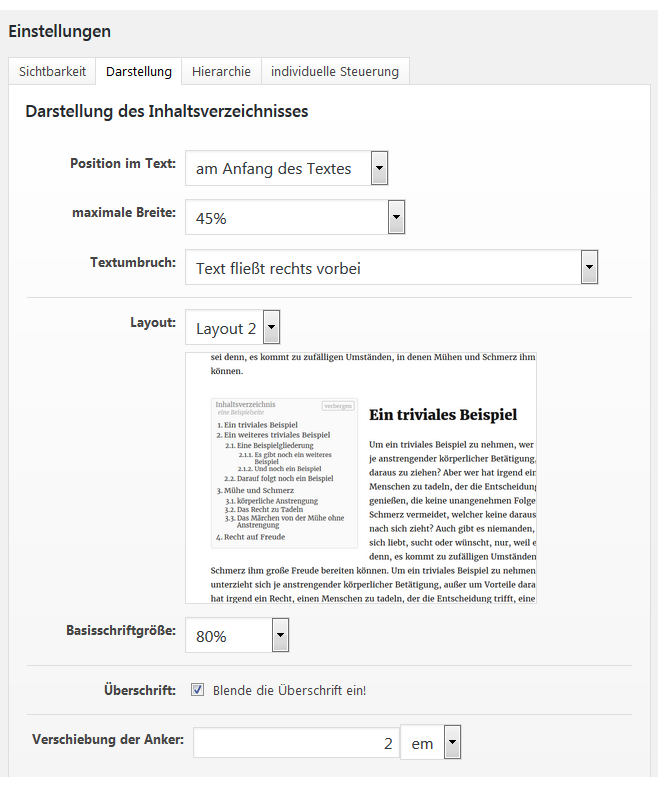
With these settings for the layout of the contents directory, they adapt it extensively to their website. 
To give the structure of the headings in a post, there are different settings. 
Also the side-by-side blocking of the contents directory is possible.
پێداچوونەوەکان
هیچ پێداچوونەوەیەک نەنووسراوە بۆ ئەم پێوەکراوە.
بەشداربووان و گەشەپێدەران
“WPjura Table of Contents” نەرمەواڵەیەکی سەرچاوە کراوەیە. ئەم کەسانەی خوارەوە بەشدارییان تێدا کردووە.
بەشداربووان
“WPjura Table of Contents” وەرگێڕدراوە بۆ 1 زمان. سوپاسی وەرگێڕەکان دەکەین بۆ بەشداریکردنیان.
“WPjura Table of Contents” وەربگێڕە بۆ زمانەکەی خۆت.
دەتەوێت بەشداربیت لە گەشەپێدان؟
گەڕان لە کۆدەکەدا بکە، سەیری تەمارگەی (SVN) بکە، یان بەشداربە لە ڕووداوتۆماری گەشەپێدان لە ڕێگەی (RSS).
ڕووداوتۆمارگەریی گۆڕین
0.0.17
- adaption to wordpress 5.3
0.0.16
- better version of plugin base class
0.0.15
- Adjustments made to the new editor “Gutenberg”.
0.0.14
- better version of plugin base class
0.0.13
- Fixed warning on frontend
0.0.12
- Fixed warning on user without settings menu
0.0.11
- Initial version.